|
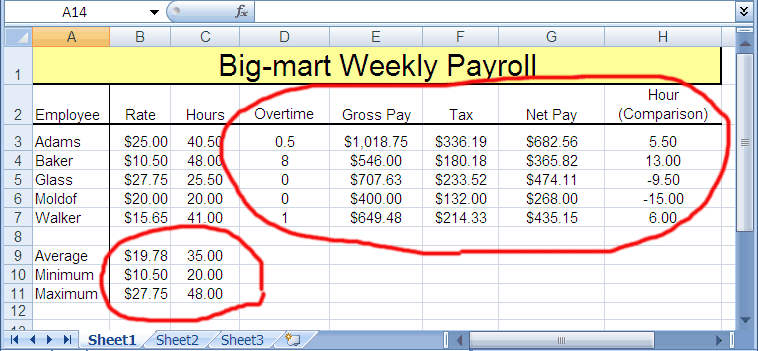
In this video, you will learn how to write Microsoft Excel formulas to
compute the data shown in the red circled area above.
More specifically you will learn the following formulas:
- Average - returns the (arithmetic mean) of the the values
- Min - returns the smallest number in a set of values
- Max - returns the largest number in a set of values
- Countif - Counts the number of cells within a range that meet the given criteria.
- If - returns one value if a condition you specify evaluates to TRUE and another value if it evaluates to FALSE.
- Multiply - use the * (asterisk) arithmetic operator
- Subtract - use the - (minus sign) arithmetic operator.
|